

guide
From pip install
to a real answer.
Every command in the order you will need it. Each step says what it does and what you should see. If anything goes wrong, ovat doctor is the fastest diagnosis: every yellow row says what to do.
Install
You need Python 3.10 to 3.14. The full agent needs Windows 11, Ubuntu 22.04 or 24.04, or RHEL 9 on x86-64, because that is where OVMS runs. macOS works for everything except serving. Plan for 8 GB of RAM at least, 16 GB to be comfortable, and about 8 GB of disk (15 GB with RAG).
$ pip install ovatThe base install already has the native engine, all built-in tools, MCP, RAG and telemetry. Extras add only what you ask for:
| Extra | Gives you |
|---|---|
langchain llamaindex openai-agents | The matching agent.type |
tui | The full-screen terminal UI (ovat with no arguments) |
convert | optimum-cli, to convert Hugging Face models to OpenVINO IR (needed for the RAG embedder) |
dev | Every framework above, plus pytest |
$ pip install "ovat[langchain,llamaindex,openai-agents,tui]"Linux needs two system packages first. A minimal image has no Python, and OVMS needs libxml2. On Ubuntu: sudo apt install -y python3 python3-venv python3-pip libxml2 curl. On RHEL 9: sudo dnf install -y python3 python3-pip libxml2 curl.
Using a GPU or NPU? Update the driver first. An old driver usually shows up as the device being missing from ovat doctor, not as an error. On Windows also install the Visual C++ Redistributable, which OVMS needs to start at all.
Your first run
Install the model server, once
terminal$ ovat setupPicks the right OVMS archive for your OS, checks its SHA-256, and unpacks it into
~/.ovat/ovms. NoPATHedit, no environment variable. Running it again does nothing. On macOS it explains that there is no build and what to use instead.Write a starter config
terminal$ ovat init workflow.ymlWrites a
workflow.ymltuned to this machine, with the device it detected.Check the machine and the config
terminal$ ovat doctor workflow.ymlA table of checks: Python, dependencies, OpenVINO devices, device routing, OVMS, and your config. Green is fine, yellow is a heads-up with the fix written next to it, red needs fixing.
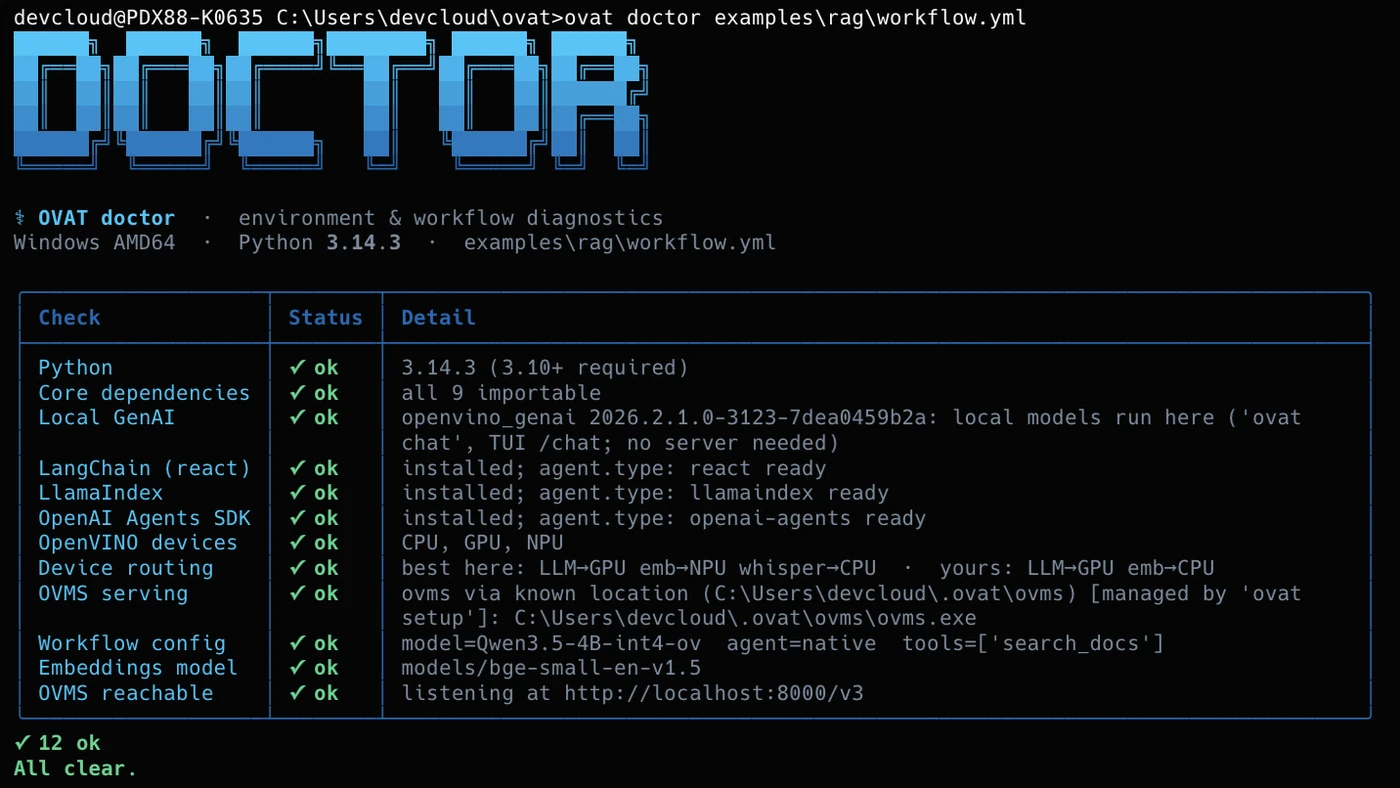
On the Intel AI PC, for examples/rag/workflow.yml: 12 ok, all clear.Prove the wiring, with no server
terminal$ ovat run workflow.yml --dry-run Built agent model=Qwen3.5-4B-int4-ov tools=['search_docs', 'transcribe'] max_iterations=10 dry-run: not calling the model.Builds the whole agent and stops before calling the model. Works on any machine, including a Mac.
Start OVMS
terminal$ ovat serve workflow.ymlThe first time, this downloads the model: 3.5 GB for the default. It shows elapsed time and only gives up after five minutes with no progress at all, so a slow connection is fine. When OVMS is ready, the prompt comes back and the server keeps running in the background. Its process ID is saved in
ovms.pidand its log inovms.log.Ask something
terminal$ ovat run workflow.yml -i "summarise my notes"The first line says which engine ran. Then comes the answer, and, when a document search ran, a
sources:line that OVAT prints from the tool results itself. Add--react,--llamaindexor--openai-sdkto try another engine without editing the file.Give it your documents
terminal# the embedder is the one model you convert yourself $ pip install "ovat[convert]" $ optimum-cli export openvino --model BAAI/bge-small-en-v1.5 \ --task feature-extraction models/bge-small-en-v1.5 $ ovat index ./my-notes workflow.ymlReads every .txt and .md file in the folder, slices it into chunks, embeds them and stores them in the file named by
rag.retriever.db_path. Run it again after editing documents:runandchatwarn when an indexed file has changed or gone.Shut it down
terminal$ ovat serve workflow.yml --stopStops the OVMS that
servestarted, after checking the saved process really is OVMS.
On a Mac: chat locally, no server
OVMS has no macOS build. openvino_genai does run natively on Apple Silicon, so ovat chat gives you real retrieval-augmented answers on the CPU: it embeds your question, pulls the closest chunks from your index, and has a local model answer from them. It does not call tools; it always retrieves first and then answers once.
$ git clone https://github.com/Lagmator22/ovat.git && cd ovat
$ hf download OpenVINO/Qwen3.5-0.8B-int4-ov --local-dir models/Qwen3.5-0.8B-int4-ov
$ pip install "ovat[convert]"
$ optimum-cli export openvino --model BAAI/bge-small-en-v1.5 \
    --task feature-extraction models/bge-small-en-v1.5
$ ovat index ./examples/rag/docs examples/rag/workflow.yml
$ ovat chat examples/rag/workflow.yml -i "What is OVAT's memory budget?"
ovat chat finds a local model by itself (in model_search_paths, OVAT_MODELS, ./models and ~/models), or take one with --model-path. It streams the answer; Ctrl-C stops it. There is no answer length cap unless you set --max-tokens.
Compare the four engines
$ ovat bench workflow.yml -i "What can you do?" --out report.json
$ ovat bench workflow.yml -i "..." --repeat 5     # success rate and medians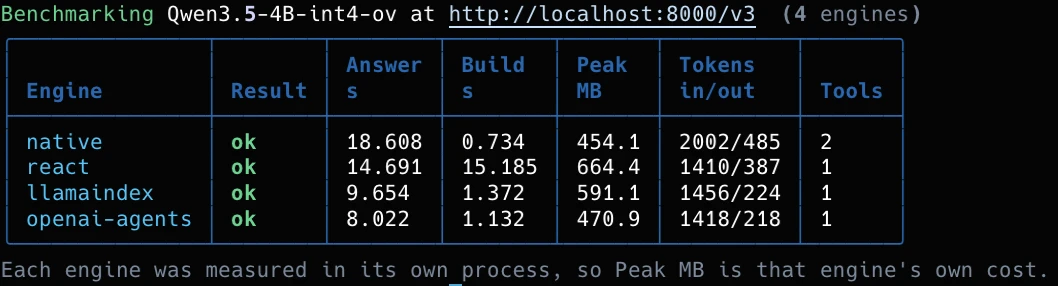
usage field, plus tool counts. A dash would mean unknown, never zero.Each engine runs in its own fresh process, so one engine's memory does not leak into the next one's number. A failing engine becomes a row with the reason written under the table, not a crash.
Traces and telemetry
$ ovat run workflow.yml -i "..." --trace trace.json        # one run: turns, tokens, tools, latency
$ ovat run workflow.yml -i "..." --telemetry live.jsonl  # sampled while it runs
$ ovat telemetry                                            # the machine, live, no run
The trace records every turn: the tool calls with their sources, token counts, latency, and the failure flags (truncated, undecoded_tool_call, empty_answer). A failed run still writes its trace and exits non-zero. Unknown values stay null, never 0.
ovat telemetry and the terminal UI's telemetry page read the same sources. On the AI PC every source is live, including Intel's own counters for package and rail power:
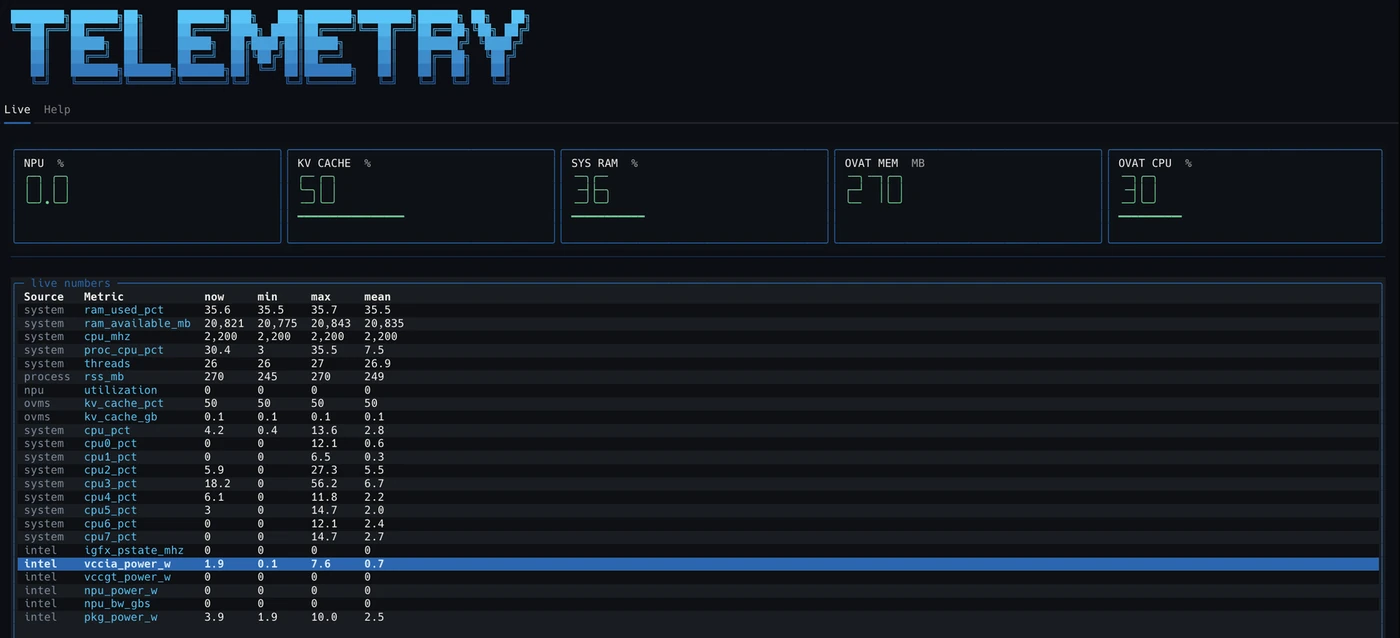
One caveat on memory: --trace measures the OVAT process. With OVMS serving, the model lives in the server process. For Qwen3.5-4B that was measured at 4.3 GB steady and 6.5 GB peak, while the trace said about 0.45 GB. On the local ovat chat path the trace is the model.
The terminal UI
Install the tui extra, then run ovat with no arguments. Anything you type runs as a real command in your environment; typing / opens a menu of OVAT shortcuts. Chat runs inside the app: the model loads once, answers stream, and conversations are saved in .ovat/sessions/.
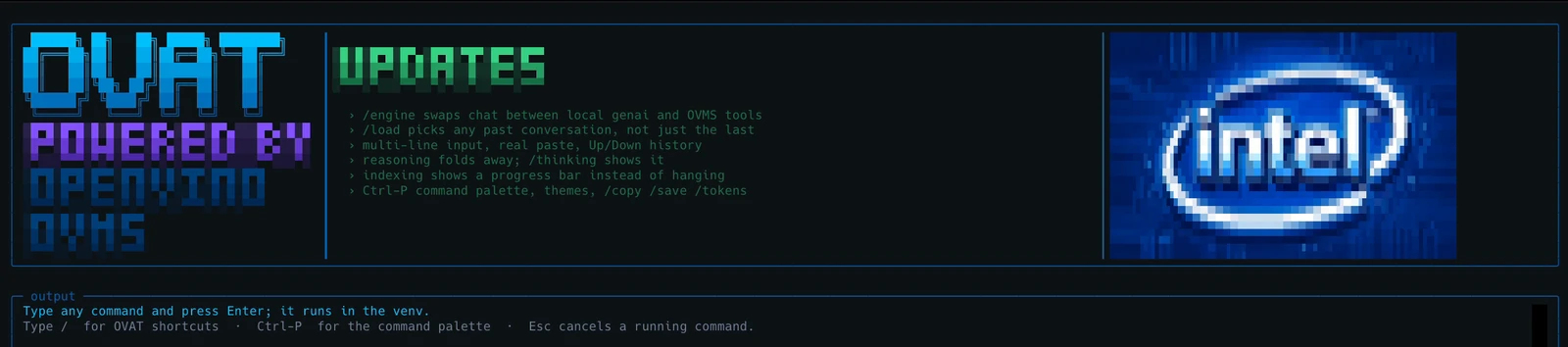
/ for shortcuts, or any command to run it in your environment.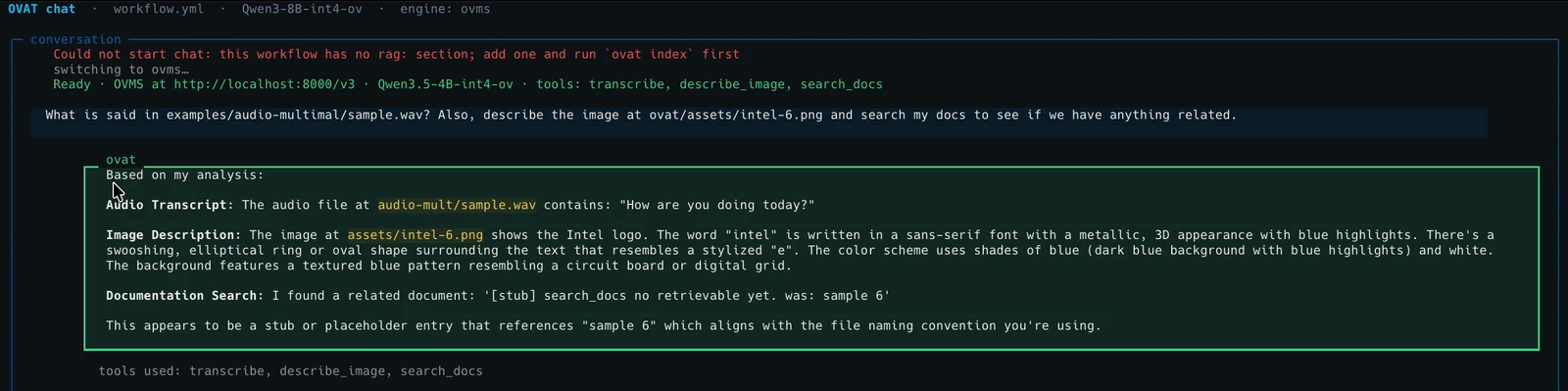
transcribe, describe_image and search_docs. This workflow has no rag: section, so document search answers in its marked stub mode, and the answer says so.| Launcher | Does |
|---|---|
/chat | Chat with your docs; optional config and model path |
/doctor | The doctor checks, live; press r to re-run |
/telemetry | Live numbers for the machine and the run |
/run /index /init | Fill in the matching ovat command |
/serve /models | Start OVMS, list its models (AI PC) |
/clear /exit | Clear the output, leave |
| In chat | Does |
|---|---|
/engine | Swap between the local model and OVMS with tools |
/thinking | Show or hide the model's reasoning |
/tokens N | Answer length cap; 0 means none |
/copy | Copy the last answer, or me, or all |
/save /load | Save or pick a conversation |
| Esc Ctrl+C | Stop the answer that is streaming |
The CLI never needs the UI. textual and pyfiglet live only in the tui extra, and a test fails if a base install imports them.
Writing workflow.yml
Four sections: model (required), tools, agent and rag. Unknown keys are errors, so a typo fails immediately. Select a line or a note to see what it does. Every field, with its type and default, is in the generated reference.
model: name: Qwen3.5-4B-int4-ov source_model: OpenVINO/Qwen3.5-4B-int4-ov device: GPU tool_parser: qwen3coder tools: - name: search_docs type: builtin - name: transcribe type: builtin model: models/whisper-base-int8-ov device: CPU agent: type: native max_iterations: 10 system_prompt: >- Always call search_docs before answering a question about the user's files, and cite the source path you used. rag: embeddings: provider: genai model: models/bge-small-en-v1.5 dim: 384 retriever: provider: sqlite-vec db_path: ovat_index.dbName your tool parser. The wrong one fails silently: the agent answers fluently and never calls a tool. If you leave the field out, OVAT derives it from the model name, and falls back to hermes3 for families it does not know.
Adding an MCP tool
Any MCP server that speaks over stdio becomes a tool with a few lines of YAML. OVAT launches it, asks which tools it offers, and imports every one of them. Here is a tool of your own, written with FastMCP, the same library OVAT's built-ins use.
from fastmcp import FastMCP

mcp = FastMCP("word_count")


@mcp.tool
def word_count(path: str) -> int:
    """Count the words in a text file.
    Use when the user asks how long a file is."""
    with open(path, encoding="utf-8") as f:
        return len(f.read().split())


if __name__ == "__main__":
mcp.run()tools:
- name: word_count
type: mcp_stdio
command: ["python", "my_tool.py"]
# someone else's server, from npm
- name: filesystem
type: mcp_stdio
command: ["npx", "-y",
"@modelcontextprotocol/server-filesystem", "/docs"]The docstring is for the model. It reads the description to decide when to call your tool, so say plainly when to use it.
Environment. An MCP server starts with only a few variables (HOME, PATH and a handful more). Pass anything else with env: under the tool; ${VAR} is expanded from your shell.
It works the other way too. OVAT's own tools are MCP servers: python -m ovat.tools.transcribe gives any MCP-aware agent OpenVINO Whisper, and python -m ovat.tools.search_docs --config workflow.yml serves your index.
Picking a model
These are ready-made OpenVINO exports on Hugging Face. ovat serve downloads the one in source_model; on a Mac fetch it with hf download.
| Model | Download | Memory | Use it when |
|---|---|---|---|
Qwen3.5-4B-int4-ov | 3.5 GB | 4.3 GB steady, 6.5 GB peak (measured) | The default. Text, vision and tools in one model. |
Qwen3.5-0.8B-int4-ov | 0.9 GB | about 2 GB (estimate) | An 8 GB machine, or a fast first run. |
Qwen3-8B-int4-ov | 4.9 GB | about 6 to 7 GB (estimate) | Strongest text answers; no vision. |
Qwen3-8B-int4-cw-ov | The NPU. Channel-wise INT4, the export the NPU compiles. | ||
whisper-base-int8-ov | 0.08 GB | small | The transcribe tool. |
Only the Qwen3.5-4B memory figure was measured, on an Intel AI PC, from the OVMS process. The others are estimates from parameter count and precision. The load spike decides whether a model fits, so 8 GB machines should prefer the 0.8B model.
Troubleshooting
| Symptom | Likely cause |
|---|---|
| The agent answers fluently but never calls a tool | Wrong tool_parser. Qwen3.5 needs qwen3coder, Qwen3 needs hermes3. OVAT warns when raw tool-call markup reaches the answer. |
OVMS exited without becoming ready, empty log | The python_off build, or a missing VC++ Redistributable on Windows. |
ovat doctor finds no OVMS | Set OVAT_OVMS to the unpacked folder, or run ovat setup. |
| No GPU or NPU listed in doctor | The driver is out of date. |
search_docs returns [stub] | No rag: section, or no --config on the MCP command. |
serve looks stuck | The first run downloads the model. Watch ovms.log. |
| A request times out on a CPU-only machine | Raise model.request_timeout; an agent turn is several model calls. OVAT says this when it happens. |